Duplicate emails from Canvas LMS
I am receiving duplicate emails from Canvas LMS or notifications@instructure.com. How can I stop this?
If you notice duplicate emails from Canvas LMS (notifications@instructure.com) in your student email inbox, this might be because notifications are turned on for both your primary email address and alias email address.
You can follow the steps below to adjust your Canvas LMS notification settings. This will stop the duplicate emails and have notifications sent to one email address only.
Access and adjust your Canvas LMS Notification Settings
- Log in to Canvas LMS
- Click on Account in the left side bar
- Click on Notifications
In Notification Settings, you will see an "Email" column for each of your email addresses. You can adjust the email notification frequency (Notify immediately, Daily summary, Weekly summary, Notifications off) for each notifcation in each notification category.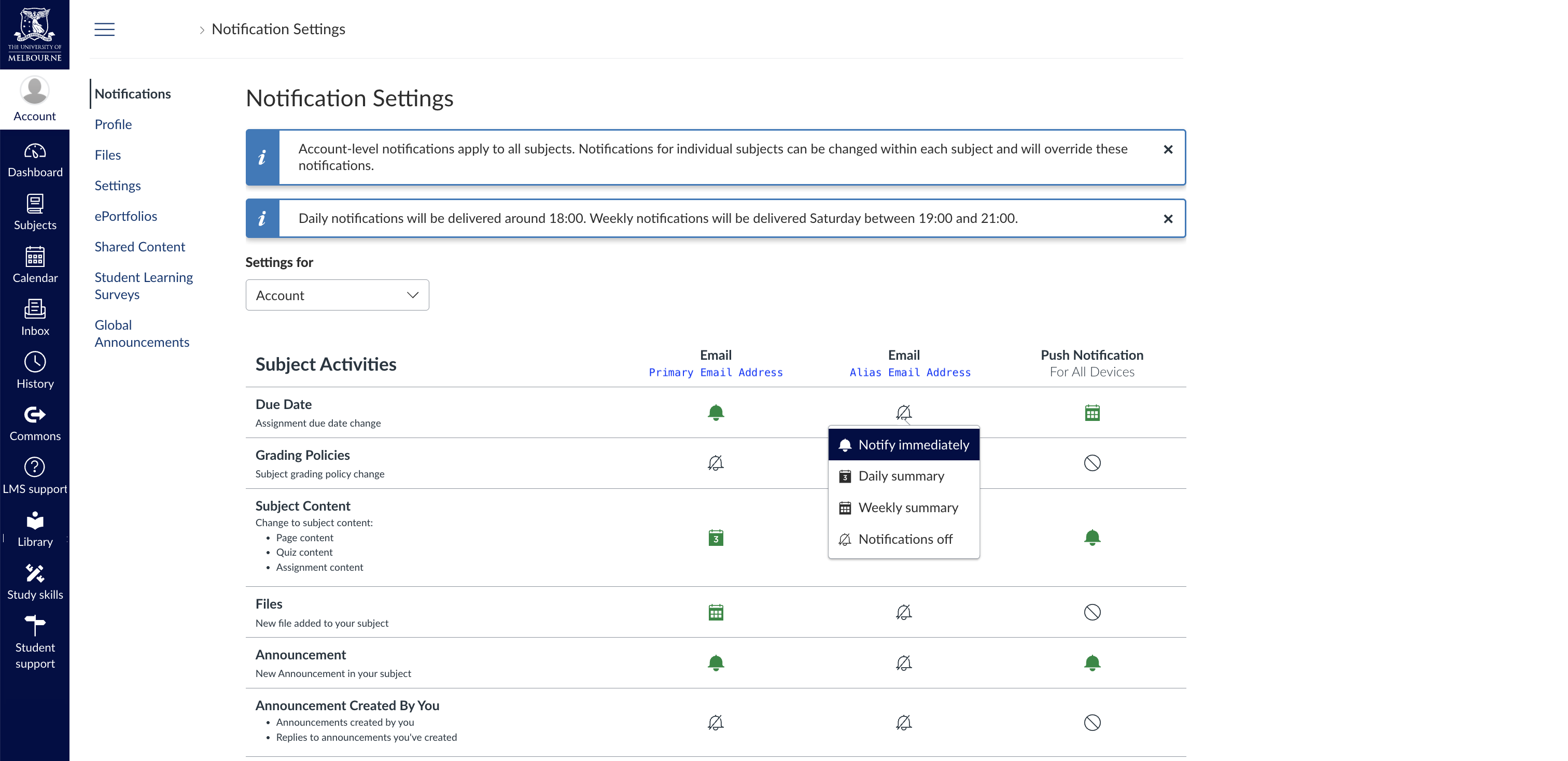
- Click on a notification icon under your alias email address
- Change the notifcation frequency to Notifications off
- Repeat this process for ALL notifications sent to your alias email address
You can also adjust the settings for notifcations sent to your primary email address to your desired frequency.
More information regarding Canvas LMS Notification Settings can be found in this official guide.
If you are still receiving duplicate emails after adjusting your notification settings, please contact Student IT.